When you run a UV roll to roll printer or supply them like we do here, you know there’s no bigger headache than turning on your machine, loading a new roll of media, and cranking out a print that’s three shades off from the last one you ran for that same client. Last quarter, one of our regular clients— a large signage shop—called us panicking because they’d wasted 120 meters of vinyl on a batch of retail window graphics that came out blotchy, inconsistent, and got rejected by the brand. That’s the kind of mistake that kills repeat work, and it’s avoidable if you nail the small, consistent steps that keep your UV prints on target. This isn’t just about hitting “calibrate” once; it’s a daily, weekly, and even monthly routine that ties together media handling, printer maintenance, ink management, and color profiling. UV Roll To Roll Printer
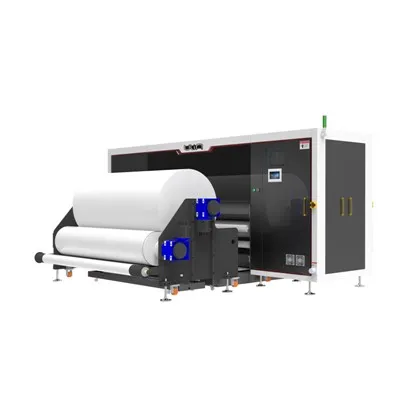
Let’s start with media, because most people don’t realize that even the cheapest, same-batch vinyl or fabric can throw your color off if you treat it wrong. I’ve seen shops buy 10 rolls of the exact same gloss PVC roll stock from the same manufacturer, and run them without acclimating them to the printer’s environment, and end up with pink shifts across different rolls. UV printers cure ink immediately when it hits the media, so if the media’s surface tension or temperature is off, the ink doesn’t lay evenly. Our team at the factory tests this all the time, and we tell every customer to let their media sit in the print room for at least 24 hours before loading it. No unrolling it in the warehouse then dragging it to the printer—let it adjust to the room’s temperature (ideally 20-22°C) and relative humidity (45-55%). Humidity is a big one: too dry, and static builds up on the media, causing bands in the print that look like color inconsistencies. Too humid, and the media stretches slightly when it goes through the rollers, leading to misalignment between passes that makes your gradients look patchy. Also, never mix media types unless you change the printer’s profile. Running a roll of matte fabric after gloss vinyl without adjusting settings is a fast track to off-color prints.
Next, printer maintenance. UV roll to roll machines aren’t set-it-and-forget-it devices. The print heads, the biggest part, wear out and get clogged even with regular cleaning, and a clogged print head doesn’t lay down the exact amount of ink it’s supposed to, which changes color. I’ll admit, when I ran a small print shop 10 years ago, I skipped weekly print head cleans to save time, and spent three days fixing color shifts instead of finishing a job. Now, with our machines, we advise users on a strict maintenance schedule: daily, check the head nozzles by running a test strip every morning before a big job. If 1-2 nozzles are out, that’s fixable with a light head clean. If more than 5% are clogged, run a deeper clean, but don’t overdo it—too many deep cleans can damage the head prematurely. The platen, the glass or metal surface the media sits on, needs to be wiped down every day too. Dust, dried ink residue, and even a tiny speck of lint can make your media sit at a slight angle, or cause the ink to cure unevenly, leading to color differences across the width of the roll. Also, check the rollers that pull the media: if they’re worn down, they can grip the media inconsistently, making it feed faster or slower in spots, which changes how the ink is deposited. Replace rollers every 6-12 months depending on usage, and clean them with isopropyl alcohol every week to prevent build-up.
Ink management is another make-or-break point, and it’s one that even experienced print shops mess up. UV inks are photosensitive, so once they’re exposed to UV light or air, their color can shift. Never leave an ink cartridge open or uncapped for more than an hour—even a small amount of air exposure can change the pigment composition. We supply our customers with sealed ink packs, and we tell them to rotate stock: use the oldest ink first, don’t open a new pack unless you’ve finished the previous one. If you have to use a partially used pack, stir the ink gently for 2-3 minutes before loading it—pigments settle at the bottom, so if you don’t mix it, the first few prints will be lighter than the rest. Also, never mix ink from different batches, even if they’re the exact same color code. Ink manufacturers tweak their formulations slightly between batches, and even a tiny difference will show up when you print large, solid colors like blue or red. Last year, a customer of ours tried to top off a half-empty cyan cartridge with a new batch, and ended up with cyan prints that looked greenish. It took us two hours to diagnose the issue, but that’s the kind of avoidable mistake that costs time and money. Also, keep your ink storage at a consistent 18-22°C, away from direct sunlight. Extreme cold thickens ink, extreme hot thins it, both leading to uneven ink flow.
Now, color profiling—this is the step that turns your printer from a machine that “prints color” to one that prints the exact color you need, every time. A lot of shops use the default profiles that come with the printer, and those are a starting point, not a final solution. Default profiles are made for general use, but your specific media, your printer’s head condition, even your room’s lighting will change how color looks. We recommend doing a custom profile for every media type and every ink batch. Here’s how we walk customers through it: run a test chart with solid blocks of each color (cyan, magenta, yellow, black, plus white if you’re using white ink) and grayscale patches, then scan that test chart with a spectrophotometer. The spectrophotometer measures the exact color values, and you use software to create a custom profile that maps your printer’s output to the exact color the client needs. But custom profiles aren’t set it and forget it—re-do them every time you change ink batches, clean print heads, or even change the media brand. Also, calibrate your monitor regularly. If your screen shows a bright red but the printer prints a dull red, you’ll never get color consistency. Calibrate your monitor once a month with a calibration tool, and make sure your work area’s lighting is neutral—no warm incandescent bulbs, use 5000K LED lights, which are the standard for color matching.
Wait, we almost forgot white ink—super important for roll to roll printers that print on clear or dark media. White ink has a tendency to layer unevenly, which changes the opacity and therefore the color of the top layer of ink. We advise customers to run a white ink test strip every time they load a roll of clear media, and adjust the number of white ink passes so it’s consistent across the entire roll. If you do 2 passes of white, don’t jump to 3 passes halfway through the roll unless you change the profile. Also, for white ink, clean the white ink circuit more often than the CMYK circuits, because white pigments are thicker and dry faster. A clogged white head will leave gaps in the white layer, making the color below show through unevenly.
Another thing a lot of people overlook: print mode and roll tension. When you’re printing a large job, it’s tempting to crank up the speed to get it done faster, but higher speed means less time for the ink to lay down, so it can feather or cure unevenly, leading to color shifts. We recommend sticking to the print mode that’s standard for your media—if you’re on 1440 DPI for a retail window graphic, don’t switch to 720 DPI halfway through the roll. Roll tension is also key: if the roll is too loose, the media will wrinkle as it feeds, and ink will pool in the wrinkles, making dark spots. If it’s too tight, the media will stretch, so when it’s printed and cured, it shrinks back, leading to misalignment and color shifts along the roll. Adjust the roll tension according to the media’s weight—heavier media needs higher tension, lighter media needs lower.
Now, let’s talk about real-world examples from our own customer base. We had a customer in Chicago that runs 3 UV roll to roll printers, and they were getting 10-15 color rejections a month on their vehicle wrap jobs. We worked with them to implement the routine we just covered: they started acclimating media for 24 hours, doing daily nozzle checks, custom profiling every new media batch, and rotating ink stock. Within a month, their rejections dropped to less than 2 a month, and their repeat orders went up 28% because their clients knew they could rely on consistent color. That’s not luck—that’s consistent, routine care.
But even with all that, there are times when color shifts happen unexpectedly. If you follow all the steps above and still see shifts, check for things like old print heads (print heads last 6-12 months with heavy use, and even with maintenance, they’ll start to degrade), or changes in your room’s environment (if the AC breaks and the room jumps 5°C for a day, let it stabilize for 24 hours before running big jobs). Also, if you’re working with different clients’ color specifications, make sure you save each profile and apply it to the correct job—mixing a client’s brand color profile with another will lead to big differences.
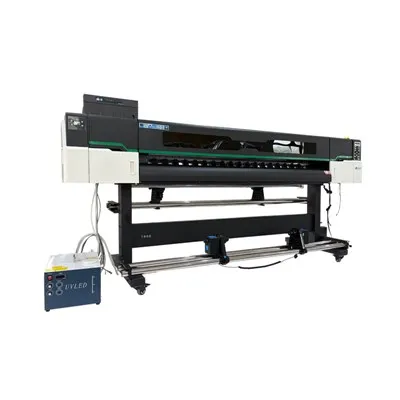
At the end of the day, ensuring color consistency on a UV roll to roll printer isn’t about fancy, expensive upgrades—it’s about discipline. It’s about not skipping the daily nozzle check, not loading a new roll of media straight from the warehouse, not using old ink that’s settled at the bottom of the cartridge. It’s about treating your printer, your media, and your ink as interconnected parts, not separate components. If you’re running into persistent color issues, or want to upgrade your printer to make this routine easier, feel free to reach out to our team to chat through your specific needs and find the right UV roll to roll solution for your business.
Eco Solvent Printer References
- International Organization for Standardization. (2019). Graphic technology – Digital prints for industrial applications – Part 1: Color measurement and color management. ISO 12647-7:2019.
- PrintHead Solutions. (2022). Maintenance Best Practices for UV Curable Print Heads. Technical Whitepaper.
- Inkjet Technology Association. (2021). Media Handling and Color Consistency for Roll-to-Roll UV Printers. Industry Guide.
- Wilson, T. (2020). Color Management for Wide Format Printing. Journal of Digital Printing Technology, 14(3), 45-52.
Hangzhou Yulan Technology Co., Ltd.
Hangzhou Yulan Technology Co., Ltd. is one of the most professional uv roll to roll printer manufacturers and suppliers in China. With abundant experience, we warmly welcome you to wholesale the newest uv roll to roll printer in stock here from our factory. Good service and quality products are available.
Address: Building, No.128 Rihui Road, Linping District, Hangzhou, China.
E-mail: ulinprint@gmail.com
WebSite: https://www.ulinprinter.com/
